
FMG Release Highlights
Exclusively for Home Office Staff
Latest Releases
FMG updates this section monthly to share some of the more significant releases and enhancements you may enjoy learning about.
SOC 2 Certification Type 1 - 6/26/24
FMG has achieved the SOC 2 Type 1 certification, a significant milestone that underlines our commitment to robust data security practices. This certification verifies the adequacy of our cybersecurity controls, policies, and procedures, ensuring the protection of customer data at a specific point in time. This certification simplifies the Vendor Risk Assessment (VRA) process, providing reassurance to existing advisor customers about the safety of their sensitive business data. As we move forward, we are committed to achieving SOC 2 Type 2 certification, which will assess the effectiveness of our controls over a period, ensuring ongoing data security.
- Enhanced Trust: Builds trust and confidence in FMG’s data security.
- Regulatory Compliance: Helps clients meet regulatory requirements and maintain industry-standard InfoSec practices.
- Competitive Advantage: Positions FMG as a secure and reliable partner in the market.
- Efficiency: Streamlines the Vendor Risk Assessment (VRA) process, saving both FMG and our clients time and resources.
Multi-User Manage Account Access Feature - 6/18/24
We’ve just released a new functionality that enables Publisher users to manage multi-user access seamlessly. This change is available to all Publishers who have access to manage delegate (multi-user) access. From the Delegates area, we’ve added an “action” menu item where you can effortlessly grant or remove indirect access. This new functionality provides greater control and convenience and eliminates the need for time-consuming processes previously required to manage account access.
Key Benefits:
- Enhanced Control: Manage multi-user account access directly from a new action modal.
- Efficient Management: Add or remove indirect access without needing to upload an update file.
- Improved Search Capabilities: Easily find specific users by Name or Public ID.
- Access Type Filter: View and update access types quickly.
- Bulk Actions: Use checkboxes to grant or remove access for multiple accounts simultaneously.
%20(1000%20x%20500%20px).png?width=1000&height=500&name=Enterprise%20page%20(858%20x%20716%20px)%20(1000%20x%20500%20px).png "Enterprise page (858 x 716 px) (1000 x 500 px)")
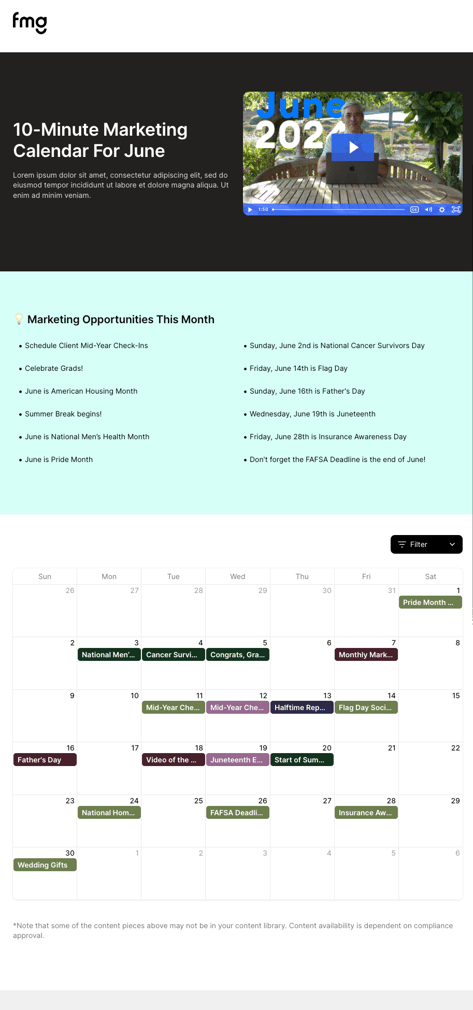
New Monthly 10-Minute Marketing Calendar - 6/11/24
We just launched a monthly marketing calendar to help advisors and their staff easily find new and recommended content and get the most out of their FMG tools. The Monthly 10-Minute Marketing Calendar includes content recommendations for emails, automations, social posts, downloadables, and new Canva templates to be used as guidelines for new social posts. The calendar includes direct links to the recommended content, making it a cinch to schedule. This calendar removes the mental hurdle of deciding what content to use each month, making marketing efforts more consistent and effective. This calendar replaces the current content recommendations email customers receive from FMG at the beginning of each month.
Key Benefits:
- Content variety: Includes automations, emails, social posts, downloadables, and new Canva templates.
- User-friendly: Click to use content directly from the calendar.
- Feedback loop: Vote on future content topics.
- Who is this available to? The content calendar is available to FMG Marketing Suite customers, with the exception of Do It For Me customers and firms that have already provided a marketing calendar.
- Content restrictions: Some content may be restricted by your Compliance team.
Publisher Collections Modernization - 6/4/24
All Publisher users who can add Collections will now experience a brand new, modernized user interface for our Publisher Collections and the Collection Create/Edit pages. In addition to the new user interface, we have improved the sorting grid by enhancing the drag-and-drop feature with an auto-scrolling functionality. Updates specific to the Collection Create/Edit pages include new requirements for Collection images and descriptions to ensure consistency and clarity. This modernization is part of our ongoing commitment to improve user experience and align with our latest Content Library landing page release.

Please note the following changes to how Publisher users can add content:
- Collection description limit: Maximum character limit reduced from 4,000 to 1,000 for concise and impactful descriptions.
- Mandatory image: Each Collection now requires an image for better visual identification.
- Simplified Interface: Removal of table sort functionality for a cleaner, more straightforward experience.
New Look and Better UI for the Content Library Landing Page - 5/21/24
We just revamped the Content Library to speed up performance and better showcase our content! This new and improved UI has been added to all marketing accounts on our platform, making the Content Library homepage an enhanced “dashboard” for all. The changes to the Content Library page include updates to the Content Library tabs, "Collection" cards, and the search box. These changes will not affect the rest of the Content Library, including Filters, a tabbed view beyond the landing page, and Collections details.

Key Updates:
- Library Tabs: The Library Tabs have been redesigned for a more streamlined user experience.
- Collection Cards: We're enhancing the visual appeal of Collection Cards by removing the overlay to make images more vibrant.
Will these changes apply to private labels?
Yes. However, all specific branding will be maintained, such as logos and branding for private labels.
Content-Specific Email Disclosures - 5/21/24
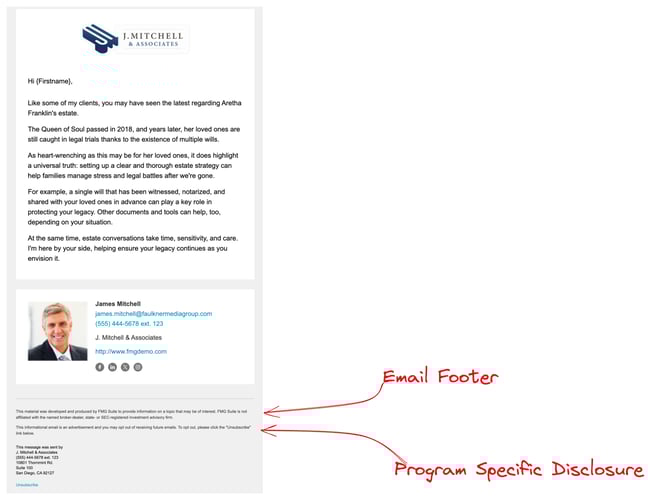
We are excited to announce a new feature that enables Agency Publishers to attach a content-specific disclosure to each email in a new Email Footer section. This new section will appear below the email signature and provide more creative freedom for content-specific disclosures. The key benefits will include tailored disclosures for specific email content, enhanced compliance with regulations, greater transparency for email recipients, and a more aesthetic disclosure layout that no longer impacts advisor’s email designs. This empowers Agency Publishers to create a unique email footer for each email, providing a dedicated space for content-specific disclosures. Compliance teams will then review the footer during their regular review process.
Can the tailored disclosure be removed or edited by subscribers?
No, if a subscriber clones an email that includes a tailored disclosure, it cannot be edited or removed.
Where will the content-specific disclosure appear?
The disclosure will appear above the standard email disclosure.
Who does this affect?
This update impacts Home Office Compliance teams and Agency Publishers. It also directly impacts advisors, as they no longer see disclosure within the email's body copy. Now, the disclosure is at the bottom, near the other disclosures. This enhancement gives our customers more design freedom, allowing them to create more aesthetic email designs.
Looking for Customer-Facing Release Updates?
Check out our Suite New Releases page linked below.
Tip: You can always find the link to this page on the main page of our Knowledge Center (upper right > New Releases).