
FMG Release Highlights
Exclusively for Home Office Staff
Latest Releases
FMG updates this section monthly to share some of the more significant releases and enhancements you may enjoy learning about.
NEW! Celebrations Automation: Ready-Made Hanukkah Outreach - 10/28/26
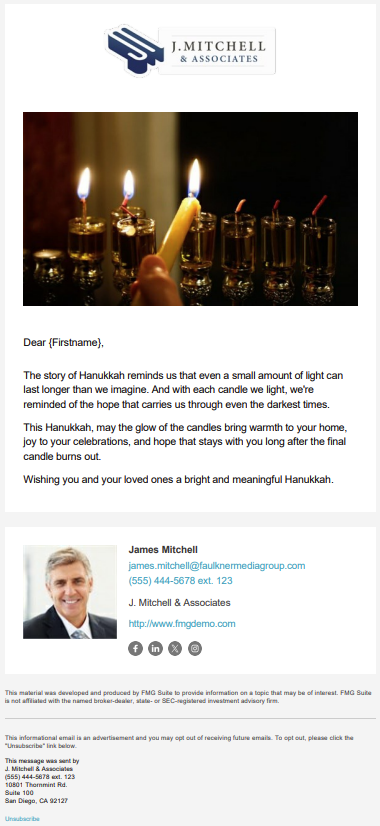
Celebrations Deluxe now includes a Hanukkah automation, giving your advisors a ready-made way to connect with clients through a message of light and hope. The automation is off by default, sends on the first day of Hanukkah, and follows your existing compliance approval workflow. Content is now available for review as of October 28th.
What's Changing?
A Hanukkah direct email automation has been added to the existing Celebrations Deluxe agency. It sends every year on the first day of Hanukkah, which this year is December 4, 2026, with reminder emails to advisors that will send on December 2. The automation is off by default. Advisors turn it on in Automated Marketing and select their audience groups. Your compliance team will have until December 3, 2026 to approve the content in order for it to send for your advisors on December 4.
It is available to all FMG users with Celebrations Deluxe agency activated, including those with Marketing Suite Premium, Elevate, DIFM, and the Celebrations Collection add-on.
Key Benefits:
-
Expand holiday coverage for your advisors with a Hanukkah greeting that follows the same format as other Celebrations Deluxe messages.
-
Maintain advisor choice, since the automation stays off until each advisor turns it on and selects an audience.
-
Strengthen compliance oversight by routing the email through your existing approval workflow before it sends.
-
Reduce one-off email requests by giving advisors a ready-made message.
Common Questions:
Is this turned on for our advisors automatically? No. The automation is off by default, and each advisor chooses whether to turn it on.
How will our compliance team know when to review it? Compliance admins can turn on FMG Content notifications on the Compliance Settings page to receive an email whenever new content enters the Library queue. The Hanukkah content is available for review as of October 28. Going forward, holiday automation content is typically uploaded 4 to 8 weeks before the holiday.
What happens if the email is not approved in time? Firms that require compliance review must approve the content before the send date, or it will not send for your advisors.
Can we remove this automation for our firm? Automations are managed at the agency level, so Hanukkah cannot be removed on its own. Removing it requires opting out of the entire Celebrations Deluxe agency for your associated subscribers. Your compliance team can also reject the email content, which keeps it from sending.
Events: Less Duplicate Review, Faster Repeat Publishing - 10/8/26
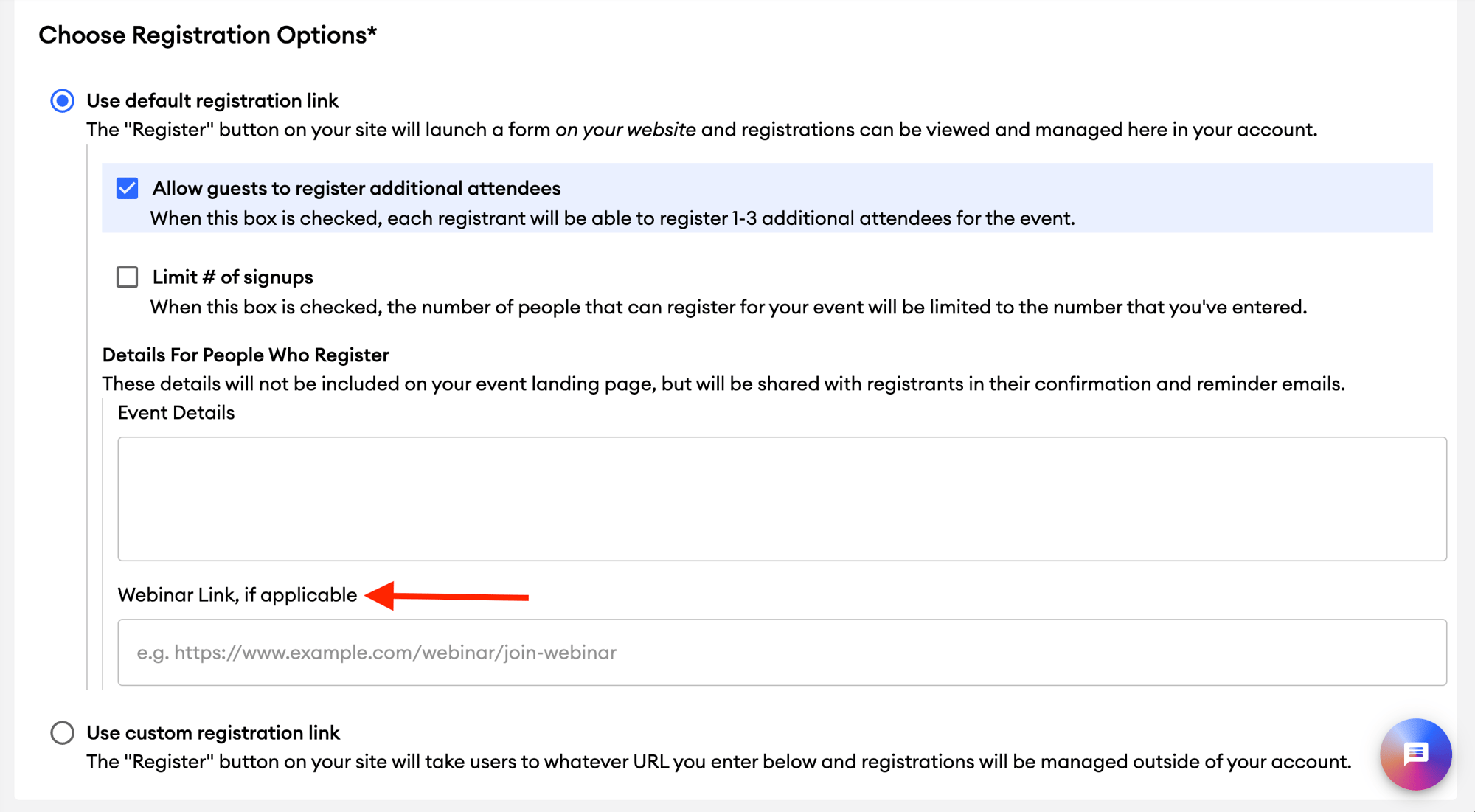
A dedicated webinar link field is live, and as of October 8, 2026, advisors can update the date, location, or webinar link on an approved event without starting a new compliance review, so your compliance teams can focus review time on new and changed content. Recurring events such as monthly webinars and coffee talks often change only in logistics, so this update aligns review effort with the content that matters most. Coming soon: a Repeat Event option in mid to late October 2026, and carry-over of previously approved promotional email and social sequences to repeated events in early Q4. All other event content, including name, description, summary, disclosure, and website copy, continues to trigger compliance review exactly as it does today.
What's Changing?
- LIVE: A dedicated Webinar Link field in the event editor. The link appears in registrant confirmation emails and stays off the public event page.
- LIVE: Event date (start date, end date, and time zone), event location (name, address, city, region, and postal code), and webinar link can be updated on an approved event without a new compliance review. This applies whether an advisor edits an approved event or copies one.
- Coming Soon: A new Copy Event option, Repeat Event, lets advisors copy an approved event, update those three fields, and publish right away. Use as a Template continues to work as it does today and routes to your team before publishing.
- Unchanged: Event name, description, summary, disclosure, and website copy continue to go through compliance review.
Key Benefits:
-
Reduce duplicate review of event details your team has already approved.
-
Focus review time on new events and material content changes.
-
Maintain compliance oversight. New events always go through review, and once an event is approved, every content field other than date, location, and webinar link still requires review when edited.
-
Shorten the wait for advisors to publish recurring events, which extends their promotional window.
-
Simplify webinar logistics with a dedicated link field that keeps join links off the public event page.
Does this reduce our visibility into the events our advisors hold?
You retain full visibility into event content. Repeating an approved event, or adjusting its date or location, no longer creates a duplicate case for material your team has already reviewed. Anything that changes the substance of an event still comes to you.
Which fields still require compliance review?
Newly created events will go through compliance review. After an event is approved, the event date, event location, and webinar link can be updated or copied without triggering a new review. All other event content continues to go through review whenever it is edited.
How will our team know when an advisor holds an event if it does not generate a compliance case?
Compliance review is designed to evaluate event content rather than track event schedules. If your team relies on compliance cases for event awareness today, contact your account team to discuss options that fit your process.
Can we configure or opt out of these updates for our firm?
These are global platform updates and are not configurable. The review requirements for all other event content stay exactly as they are today.
Institutional Intelligence: New Partner and Homepage Banner - Coming Soon
We previously announced the launch of Institutional Intelligence with Wealth.com as our exclusive founding partner (press release). We're now expanding the program with additional partners, Allspring, Tema ETFs, VistaShares, Cue Studio, Foundation Source, Bento, and Nitrogen, alongside Wealth.com, and rolling out a new banner on the Content Library homepage.
What's New:
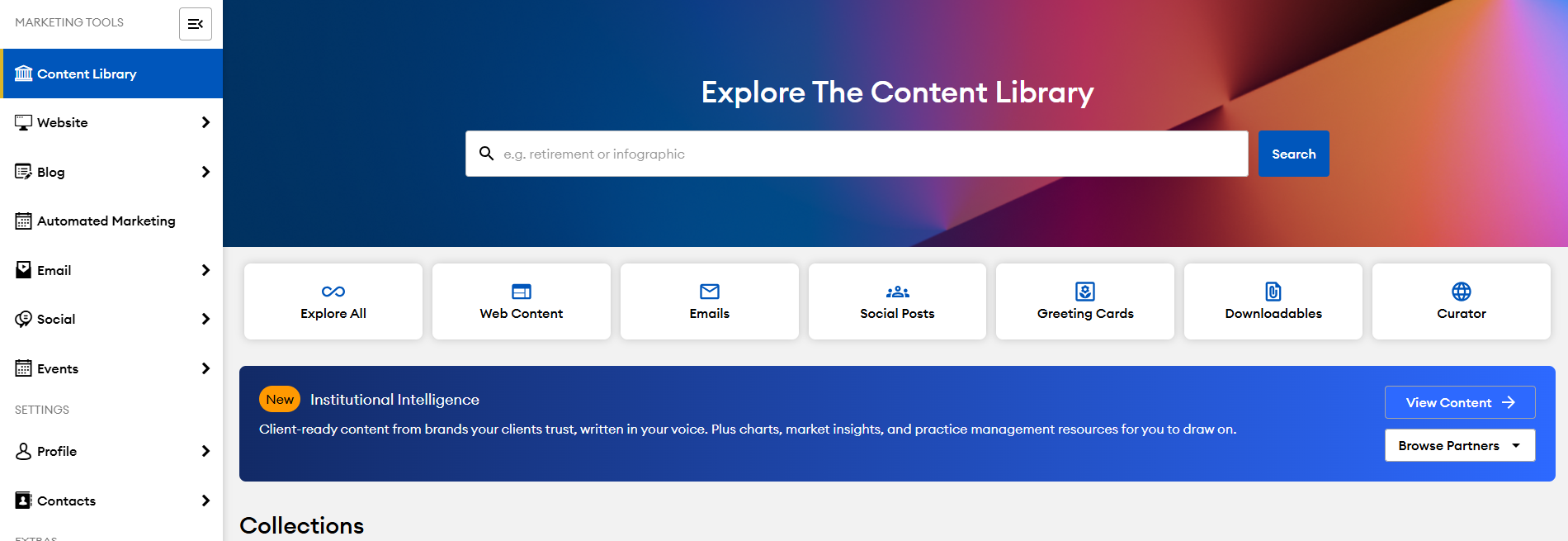
A new Institutional Intelligence banner now appears on the Content Library homepage, below the content type cards. It includes:
-
A "View Content" button that takes advisors straight to the Institutional Intelligence section
-
A "Browse Partners" dropdown, so advisors can jump to a specific partner's collection without scrolling
-
Initial Partners: wealth.com, Allspring, Tema ETFs, VistaShares, Cue Studio, Foundation Source, Bento and Nitrogen.
Nothing changes about how this content reaches your advisors' clients. It routes through the same approval and distribution flow as any other content on the hub. The only change is a new section on the homepage that surfaces it.
As always, you can hide specific content or opt your program out of any partner at any time. Just let us know.
Looking for Customer-Facing Release Updates?
Check out our Suite New Releases page linked below.
Tip: You can always find the link to this page on the main page of our Knowledge Center (upper right > New Releases).