
FMG Release Highlights
Exclusively for Home Office Staff
Latest Releases
FMG updates this section monthly to share some of the more significant releases and enhancements you may enjoy learning about.
New Notes Modal for Greeting Card Library Cases - 9/24/24
To help home office compliance reviewers improve the usability and efficiency of documenting important information in Library Cases, we’ve launched an upgraded ‘Notes’ modal for Library Cases for the Greeting Card content/automation. This enhancement allows compliance reviewers to add multiple notes for the Greeting Cards library item, each up to 500 characters, significantly improving documentation and information accessibility. This allows for easy navigation with notes divided into separate pages if there are more than five and a notes tag icon for quick identification. The enhancement is available to all compliance users across all programs. Access the new feature by navigating to Library Cases > Automations > Greeting Cards and clicking the Notes link.
%20(1000%20x%20500%20px)%20(1).png?width=1000&height=500&name=Enterprise%20page%20(858%20x%20716%20px)%20(1000%20x%20500%20px)%20(1).png "Enterprise page (858 x 716 px) (1000 x 500 px) (1)")
Steps for Home Office Compliance:
- Go to the Greeting Cards Library page and view the submissions and notes.
- Click on Library Cases > Automations > Greeting Cards in the left navigation menu.
- When at least one note is added, any cases with notes will have a "Notes" tag icon.
- Click the Notes hyperlink to open the Notes modal.
- Add notes up to 500 characters long. The most recent note appears at the top.
- NOTE: While users can add multiple notes, editing or deleting notes is not yet supported.
FAQs:
Can this feature be turned off?
This feature cannot be turned off.
How can a compliance reviewer add a note to a greeting card?
To add a note to a greeting card, click the Notes hyperlink in the grid to open the Notes modal, then add your note.
Is there a limit to how many notes a compliance reviewer can add?
There is no limit to the number of notes you can add.
Can a compliance reviewer edit or delete a note once it’s added?
Currently, this feature only supports adding notes. Editing or deleting notes is not available.
Will this enhancement be available for other content aside from Greeting Cards?
Yes. Stay tuned for more exciting enhancements we will make to other Compliance Library items, such as emails and web content. Release dates are to be determined.
New IP Address for Email Delivery - 9/6/24
We added four new IP addresses to accommodate the growing volume of emails sent through our platform. This update is recommended but not required. It is crucial for maintaining efficient and timely email processing and delivery. This change is particularly relevant for home offices, which often have strict email policies in place. Home offices may need to inform their IT departments to safelist the new IP addresses to avoid any disruption in email delivery, especially for archive and compliance emails. By taking these steps, you can ensure that your advisors’ email communications remain uninterrupted and continue to benefit from our platform's enhanced capabilities.
- Timely Email Processing and Delivery: The four new IP addresses will help manage the increased volume of emails, ensuring that emails are processed and delivered promptly.
- Improved User Experience: By scaling our infrastructure, we aim to provide a seamless experience for all users, particularly in handling high email volumes.
Why Are We Making This Change?
As our platform continues to grow, the volume of emails sent has significantly increased. Expanding our IP address range is essential to ensure optimal performance and timely delivery.
Action Recommended*
Home offices may need to inform their IT departments to safelist the following new IP addresses to avoid any disruption in email delivery, especially for archive and compliance emails:
69.72.42.234
204.220.171.49
159.112.250.19
143.55.224.233
*This does not have a deadline; however, we highly recommend making this transition.
Thank you for your cooperation in implementing these changes. For a complete list of our IP addresses, please refer to our help article. If you have any questions, please reach out to our support team at (858) 251-2420 or view more information here.
Marketing Suite Business for Mid-Market RIAs, Banks, and Credit Unions - 9/6/24
FMG released a new product offering, Marketing Suite Business, tailored specifically for multi-advisor teams and mid-sized firms and ideal for mid-sized businesses: banks, credit unions, RIAs, and agencies. Marketing Suite Business is a cost-effective solution designed to address the complex needs of these businesses and offer tools for efficient operation and growth. It includes multiple accounts, a large number of contacts, exclusive access to our SOC 2 Report, an enhanced Publisher tool for seamless content distribution, and a dedicated Business Support Team for personalized assistance. For more information, check out FMG’s recent press release.
- Multiple Accounts: This package includes five accounts and is ideal for teams of 5 - 30 financial professionals. For larger teams, we offer Marketing Suite Enterprise.
- Large Number of Contacts: Comes with 10,000 marketing contacts to meet mid-market needs.
- Enhanced Publisher Tool: Seamless content distribution across all users.
- Dedicated Support Team: Personalized assistance for efficient operation.
- Enhanced Security: The security measures and compliance process is particularly valuable for businesses operating in regulated environments. FMG is SOC 2 Type 1 certified, enabling a significantly more streamlined and efficient onboarding and data security process. We provide exclusive SOC 2 Report Access and a collection of FMG security and policy documents, such as disaster recovery plans, privacy policies, proof of insurance, and detailed SOC 2 documents covering data retention, information security, network security, physical security, and AI usage.
- Additional add-on features, such as a Customer Vendor Risk Assessment, are available for an additional cost.
For more information on the complete package, please refer to our brochures:
For Bank and Credit Unions: FMG Mid Market BrochureFor RIAs: FMG Mid Market Brochure
FAQs:
- Can existing customers upgrade to the new Business product? Yes, they can reach out to FMG’s dedicated team for more information and pricing: mminfo@fmgsuite.com or 858-251-2460.
- What is an account? An account represents one instance of the FMG platform, similar to a subscriber license but allows multiple instances under a single account.
- What support is available for Marketing Suite Business clients? A dedicated Business Support team is available for mid-market clients.
- How does Marketing Suite Business handle multi-user and account switching? Publisher for Business allows for impersonation and lightweight publishing across multiple accounts.
- Who is Marketing Suite Business designed for? Mid-market firms: banks and credit unions, RIAs, and agency clients. Marketing Suite Business is ideal for teams ranging from 5-30 advisors.
- Who can I contact if I’d like to learn more? Your home office team or decision-makers at firms you support can contact FMG’s dedicated mid-market sales team at mminfo@fmgsuite.com or 858-251-2460.
- Do you have any more information I can review and share with any enterprises interested in learning more? For more information on Marketing Suite Business and Marketing Suite Enterprise, we offer two brochures for our enterprise partners for your review (linked above). Please feel free to share this information with your decision-making partners at enterprises you work with.
To utilize this new feature, click on the collapse/expand menu icon (icon with the three lines) to adjust its state. Once set, the menu will remain in the chosen state (collapsed or expanded) as users navigate through their FMG account.
%20(1000%20x%20500%20px)-1.png?width=1000&height=500&name=Enterprise%20page%20(858%20x%20716%20px)%20(1000%20x%20500%20px)-1.png "Enterprise page (858 x 716 px) (1000 x 500 px)-1")
New Email Display Options for Websites and Landing Pages - 8/19/24
Website customers on our most updated themes and all Marketing Suite customers now have more control over which email address displays on their website or content landing pages. The email address will display on the website footer, but depending on the user’s chosen header design, the email can also display the header.
Key Benefits:
- Increased Flexibility: Advisors can now differentiate between the email address used for marketing communications and the one displayed on their website.
- Enhanced Control: This update allows advisors to manage their contact information more effectively, ensuring the correct email address is visible to their audience.
What's Changing:
- This new feature is available under the "Primary Email" field and the section "Use a different email address for your website."
- When enabled, users can enter a separate email address to be displayed on their site, subject to compliance approval.
- This update doesn't support multiple email addresses. However, the advisor can now use one email address on their website and a different one for their marketing emails.
How It Works:
Advisors can navigate to Profile > Contact Information. Next, toggle on "Use a different email address for your website." Then, enter the desired email address for their website. Lastly, they will submit for compliance approval to update their website or landing pages.
More information
Sent and Scheduled Email Page - 8/19/24
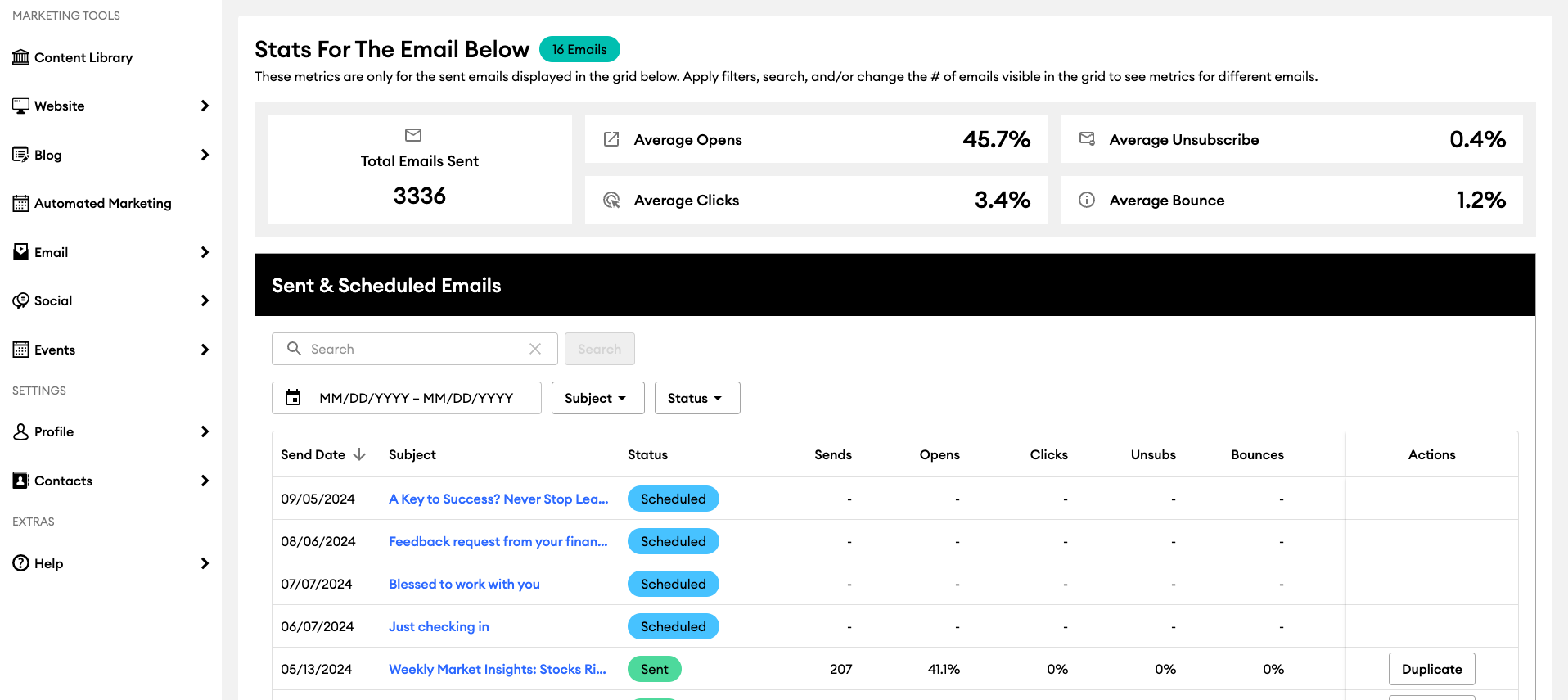
The "Sent & Scheduled" email section includes improved functionality and new features that make it easier to understand email performance. Improvements include enhanced filters, customizable columns, and a new metrics section. This update affects all users with email capabilities on our platform.
Key Benefits:
- Enhanced Visual Layout: Improved readability for a better user experience.
- New Filters: Quickly drill down to specific emails using new date and subject line filters.
- Customizable Columns: Tailored views - by rearranging and hiding columns to focus on the most relevant information.
- Insightful Metrics: A new metrics section that aggregates email performance data, offering valuable insights into email campaigns.
New Marketing Automations Now Live! - 7/29/24
We are excited to announce a significant upgrade to our FMG marketing automation capabilities for our advisors. This upgrade will roll out in two phases. Phase 1 of our rollout is complete. This includes new topics such as life stages, breaking news, and client nurturing. Advisors can find these new automations under Automated Marketing in the left navigation in their FMG account.
Phase 2, scheduled for September 2024, will add expanded holiday and observance emails, with options to toggle on/off individual holidays and customize the send list. We will also launch an enhanced UI for the Automated Marketing Campaign page. For firms FMG is permitted to communicate with, we will communicate these updates more broadly once Phase 2 is live.
Important: Advertising Review Alert
We are expanding the number of FMG automations. This will introduce a couple more time-sensitive pieces requiring pre-review each month. These include breaking news and content not typically accompanied by a FINRA letter.
Key points for Ad Review Teams:
FMG sent a dedicated email to compliance teams alerting them of this new content on 7/30/24.
- Ad Review Teams will receive email notifications for pending automated campaign reviews. To receive the emails, select the 'New FMG Content' notifications. This article shows how to access and check your settings.
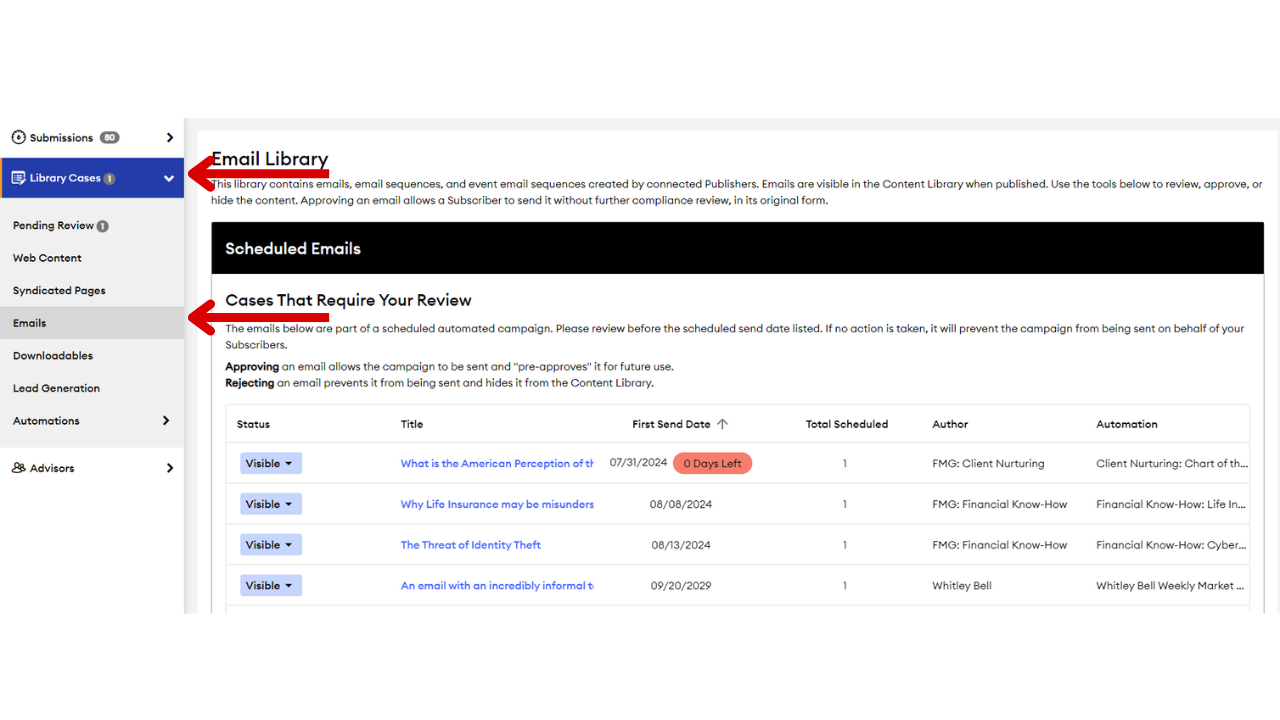
- Any campaign content that needs review will appear in the 'Scheduled Emails' table at the top of the screen under ‘Library Cases’--> ‘Emails’ as shown in the picture below.
- Advisors can now automate the Weekly Market Insights email. FMG will load that content into the content library every Saturday. For it to be sent via automation, it must be approved by 12:00 noon Pacific Time each Monday. If advisors have that campaign toggled on, the email will show in the grid pictured below.
- If the content is not approved by the send date, the automation will not activate — meaning the content will not be sent/posted on behalf of advisors.
Timely reviews are crucial to ensure advisors send all intended communications. We appreciate your attention to these new, time-sensitive approval requests. Most campaigns are sent quarterly, so the volume will not be significantly increased.
Key Benefits:
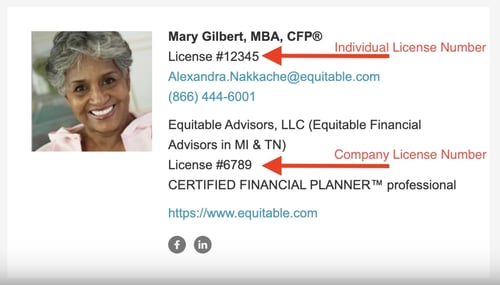
- Ease of Use: Advisors can now easily input their license numbers into designated fields, which will automatically appear in their email signatures.
- Regulatory Compliance: Some broker-dealers and state regulations may require advisors to display their license numbers in emails. This update helps advisors meet state and broker-dealer regulations without confusion or manual workarounds.
- What's Changing: Two new fields, Individual Licenses and Company Licenses, are added to the Contact Information page. The existing "Licenses" field is relabeled as "License Information Displayed on Website" for better clarity.
How It Works:
- For Advisors: Navigate to Profile > Contact Information. Then, enter the license numbers in the "License Information Displayed on Emails' section. Next, Publish their changes for compliance approval. They can preview the updated email signature in the Email section.
- For Compliance: Compliance should see this in their 'Submissions' tab and under the 'Profile Info' tab. They should also receive email notifications for submissions.
Email Signature Calendar Meeting Button - 7/29/24
Customers can now add a “Schedule a Meeting or Call” button to their email signature that directs to an advisor’s booking page, such as Calendly or Acuity. This top customer request aligns with industry standards to improve user interaction and engagement, increasing visibility and accessibility to booking meetings with the advisor online. The booking link is added to the “Appointment URL” field under Signature Links on the Contact Information page. After Compliance review and approval, this link will seamlessly integrate into the email signature area at the bottom of the email template. This functionality is available to all customers with access to FMG’s email tool.
.png?width=500&height=295&name=unnamed%20-%202024-07-24T152206.704%20(1).png "unnamed - 2024-07-24T152206.704 (1)")
FAQs:
- Customization: The button text “Schedule a Meeting or Call” cannot be customized to maintain clarity and consistency.
- Button Color: The button color is the same color that’s selected on the Email > Edit Email Design page.
- Compliance: Compliance approval is required for the calendar scheduling link to be displayed in email signatures. When logged into the FMG compliance admin, compliance can find these submissions in the 'Profile Info' section of the 'Submissions' tab.
- Calendar scheduling: This feature does not function as a standalone calendar scheduling application. It displays the advisor’s calendar scheduling link as a button in their email signature. The advisor must have a scheduling application set up to utilize this feature. Commonly used scheduling applications include Chili Piper, Calendly, and Acuity.
For more information, please review the following helpful article: Adding a Calendar Meeting Button to Email Signatures.
Understanding and Addressing Website Security Reports - 7/2/24
Safeguarding your advisors website’s is paramount for both compliance and peace of mind. FMG has compiled a comprehensive guide to help you and advisors understand the most common findings and when it’s necessary to seek support. Find more information here.
What Are Website Security Reports?
Website security reports identify potential vulnerabilities in your site, often generated by services like Security Scorecard or insurance companies. Some findings may indicate genuine concerns, while others may result from generic tools used in the wrong context.
Our Approach to Website Security:
We understand that receiving these reports can be concerning. However, it’s important to note that not all findings are relevant or actionable within the context of our platform. Our current configurations are designed to balance security and functionality optimally for our clients. Therefore, not every suggestion from these reports will be implemented, especially if it compromises functionality or does not align with our broader security strategy.
When an Advisor Should Seek Support:
Before contacting our support team, we recommend advisors:
- Review their security report.
- Compare findings with our explanations here.
- Documenting specific concerns for clarification.
- This preparation will help us provide more effective assistance.
vCard Downloadable Contact Information - 7/2/24
We are excited to introduce a new feature that enhances the way your clients and prospects can connect with you. FMG now offers downloadable contact information in vCard format directly from your website and landing pages. This feature provides a convenient way for visitors to easily download and store your contact details, particularly benefiting mobile users who can seamlessly save this information on their devices. The update is live for Marketing Suite content landing pages and the Website Suite developer theme as of July 10, 2024.
- Convenient for visitors to download and store contact details
- Especially effective on mobile devices
- Affected Users: All users of FMG's Website and Marketing Suite
How to Enable:
- Website Suite Users: Navigate to Website > Team Members, select a team member to edit, and toggle on the "Display contact card link" option.
- Marketing Suite Users: Go to Landing Page > Design, select the Settings button, and toggle on the "Downloadable Contact Card Link" option.
- Compliance: No additional compliance approval is needed as the vCard includes only pre-approved contact details.
Looking for Customer-Facing Release Updates?
Check out our Suite New Releases page linked below.
Tip: You can always find the link to this page on the main page of our Knowledge Center (upper right > New Releases).