
FMG Release Highlights
Exclusively for Home Office Staff
Latest Releases
FMG updates this section monthly to share some of the more significant releases and enhancements you may enjoy learning about.
Institutional Intelligence: New Partner and Homepage Banner - Coming Soon
We previously announced the launch of Institutional Intelligence with Wealth.com as our exclusive founding partner (press release). We're now expanding the program with additional partners, Allspring, Tema ETFs, VistaShares, Cue Studio, Foundation Source, Bento, and Nitrogen, alongside Wealth.com, and rolling out a new banner on the Content Library homepage.
What's New:
A new Institutional Intelligence banner now appears on the Content Library homepage, below the content type cards. It includes:
-
A "View Content" button that takes advisors straight to the Institutional Intelligence section
-
A "Browse Partners" dropdown, so advisors can jump to a specific partner's collection without scrolling
-
Initial Partners: wealth.com, Allspring, Tema ETFs, VistaShares, Cue Studio, Foundation Source, Bento and Nitrogen.
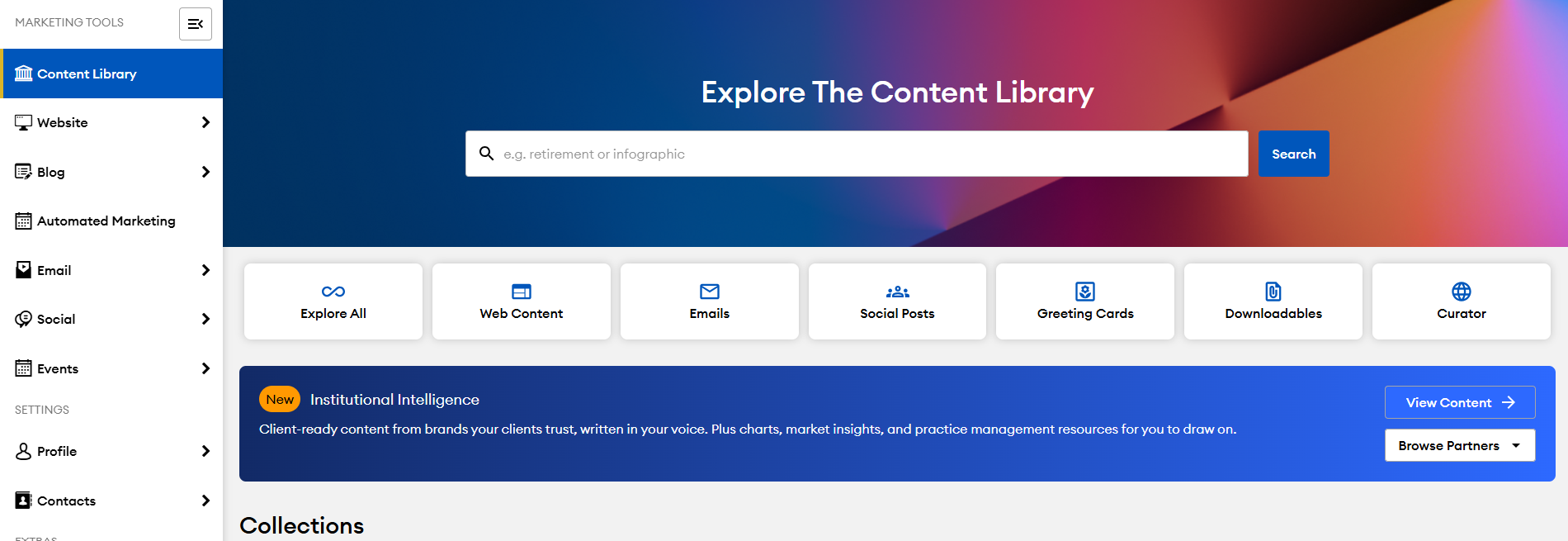
Nothing changes about how this content reaches your advisors' clients. It routes through the same approval and distribution flow as any other content on the hub. The only change is a new section on the homepage that surfaces it.
As always, you can hide specific content or opt your program out of any partner at any time. Just let us know.
NEW! FMG Connect Program - 9/9/26
FMG Connect is a new program that enables approved technology providers to integrate directly with FMG, making it easier for the tools your advisors already use to work together. Home offices remain in control of which partner integrations are available, connections are secure and permissioned, and there is no additional FMG integration fee. The program will be announced September 9, with integrations from partners including Jump, Zocks, TaxStatus, GReminders, Asset-Map, WealthFeed, and Aidentified becoming available as each partner completes development over the coming months.
What's Changing?
FMG is launching FMG Connect, a new program that enables approved third-party technology providers to integrate directly with FMG. The program will be announced on September 9, with individual partner integrations becoming available as partners complete development over the coming months.
Key Benefits:
- Connect your tech stack: FMG can work with more of the tools your advisors already use.
- Stay in control: Only approved partner integrations will be available to your advisors.
- Reduce manual work: Connected tools can share information securely, reducing re-entry and switching between platforms.
- No additional FMG fee: Connect is included in your existing FMG relationship.
Common Questions:
Which partners are participating? Initial partners include Jump, Zocks, TaxStatus, GReminders, Asset-Map, WealthFeed and Aidentified, with more planned.
Are these integrations available September 9? No. September 9 is the program announcement. Each integration will become available as the partner completes development.
Can any vendor connect to FMG? No. Home offices remain in control of which partner integrations are approved and available to their advisors.
Is advisor data secure? Yes. Partners connect through secure, authenticated APIs and receive only the access needed for their integration.
Is there an additional cost? There is no additional FMG integration fee. Advisors will need an existing account with the participating partner.
Where do advisors connect their accounts? Connections are initiated within the partner’s platform, not within FMG.
Who handles support? FMG handles issues on the FMG side, while integration-specific support is handled by the partner.
What if I have a vendor I would like you to consider? Reach out to your Enterprise Success team or have that vendor send their information to integration-inquiry@fmgsuite.com.
FMG Sutie Introduces FMG Connect to Unify Advisor Tools, Data, and Workflows
Automated Marketing: Financial Focus Replaces Video of the Month- 8/18/26
Soon, FMG's Video of the Month automation will be replaced by Financial Focus, moving from a single monthly video to a richer, newsletter-style email featuring a curated mix of videos and articles. Any Marketing Suite customer with Video of the Month currently activated will transition automatically, with their existing audience carried over — the new automation will be live in their Automated Marketing section, with the first send occurring in August. Note that the send date will shift from the third Tuesday to mid- to late month.
What's Changing?
Key differences between Video of the Month and the new Financial Focus automation:
-
Format: Financial Focus delivers a newsletter-style email each month featuring a curated mix of videos and articles from the FMG Content Library, rather than a single featured video.
-
Compliance review: Unlike Video of the Month, which was sent based on individually pre-approved Web Content, Financial Focus requires home office compliance teams to review and approve the full email each month before it sends. This is the same workflow already in place for all other agency automations.
-
Send timing: Financial Focus sends mid- to late-month. The exact date may vary month to month to accommodate the compliance review window. Content will be available to compliance teams 4 to 6 weeks before each scheduled send.
-
Stats page: The Video of the Month automation included a stats page. Financial Focus does not include a dedicated stats page, consistent with all other agency automations. Advisors can review sent email performance in the Email section of their account, under Sent and Scheduled.
-
Seamless migration: Advisors with Video of the Month toggled on will have Financial Focus automatically enabled, with their existing audience carried over. Advisors with access but VOM toggled off will find Financial Focus available in Automated Marketing, but it will not be turned on without their action.
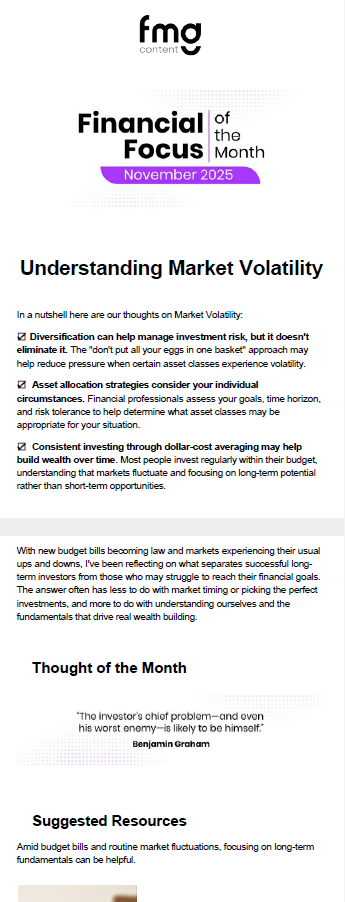
Key Benefits - User:
- Deliver a richer, more professional monthly touchpoint — Financial Focus gives advisors a newsletter-style email with a curated mix of videos and articles that reflects how effective client communication works today.
- No action required for active users — advisors with Video of the Month currently enabled will find Financial Focus automatically turned on with their existing audience intact.
Key Benefits - Home Office:
- Strengthen compliance oversight — Financial Focus requires monthly review and approval of all emails before they are sent, giving your team full visibility into what reaches contacts. This is the same process already in place for all other agency automations.
- Preserve program-level controls — any existing restrictions or exclusions from Video of the Month carry over to Financial Focus automatically, so your program's boundaries are respected from day one.
Common Questions:
Which subscription packages include Financial Focus? Financial Focus is included in Marketing Suite Premium, or available as an add-on to Marketing Suite Essential. Advisors on select legacy Marketing packages may also have access. If an advisor already has access to the Video of the Month, then they will receive the Financial Focus Automation. Advisors with access who haven't yet activated it will find it ready to turn on in their Automated Marketing section within their FMG account.
How will Financial Focus emails be identified in the sent history? Emails sent through the Financial Focus automation will appear in the Email > Sent & Scheduled section with the automation name clearly labeled in the subject line, formatted as: Financial Focus | [Email Title].
Will our existing program exclusions carry over to Financial Focus? Yes. Any program-level exclusions applied to the Video of the Month automation will carry over automatically to Financial Focus. Users in excluded programs will not have the new automation enabled.
What does the compliance review process look like for Financial Focus? Each month, the Financial Focus email will appear in your compliance review queue 4 to 6 weeks before the scheduled send date. Your team will receive an action-required notification to review and approve it using the same workflow already in place for all other agency automations. If the email is not approved before the send deadline (approximately 24 hours prior), it will not be sent to advisors in your program that month.
What happens if a piece of Web Content featured in the email is restricted or unavailable for a specific advisor? If any piece of Web Content in the Financial Focus email is unavailable to an advisor, whether because the advisor has hidden that content, turned off a content category, or the home office has restricted a specific piece, the email will not send for that advisor. This protects users from sending emails with broken or missing content links.
Will advisors lose access to their historical Video of the Month performance data? Yes. Once the Video of the Month automation is removed from a user’s Automated Marketing page, its historical send stats will no longer be accessible. Users can review ongoing email performance, including Financial Focus sends, in the Email section of their account under Sent and Scheduled. Financial Focus emails will be identifiable by their subject line format: "Financial Focus | [Email Title]."
Can advisors still send the Financial Focus email if their home office does not approve it in time? Yes. Financial Focus emails are made available each month as standalone emails in the Content Library. If a home office does not approve the automation before the send deadline, advisors can still send the email manually from their account.
Looking for Customer-Facing Release Updates?
Check out our Suite New Releases page linked below.
Tip: You can always find the link to this page on the main page of our Knowledge Center (upper right > New Releases).