
FMG Release Highlights
Exclusively for Home Office Staff
Latest Releases
FMG updates this section monthly to share some of the more significant releases and enhancements you may enjoy learning about.
Compliance Update: Introducing Our New Social Compliance Library - Available 10/1/25
We’ve added a new Social Compliance Library to the FMG Compliance Workspace. This centralized tool now gives Home Office Compliance teams a single place to review, approve, or hide all social media content before it reaches FMG subscriber users.
What's Changing?
Currently, there is no Compliance review workflow for social media content created before it is visible to users. With this release, Compliance now gain greater visibility and control over social posts and sequences. At the same time, users only see content approved or made visible according to their firm’s compliance rules.Key Benefits:
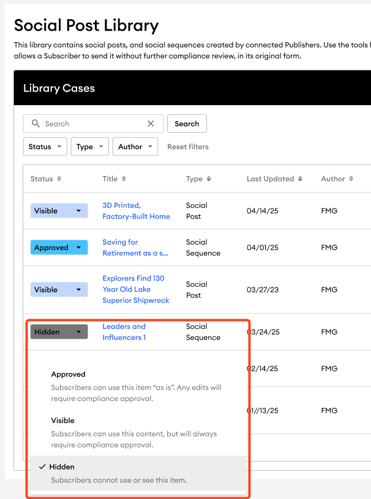
- Compliance Statuses: Content can be set to "Visible," "Approved," or "Hidden". For programs where compliance review is enabled, "Approved" content can be used by subscribers as-is, while "Visible" content still requires approval.
- Direct Previews: Compliance users can preview social posts and sequences directly from the library.
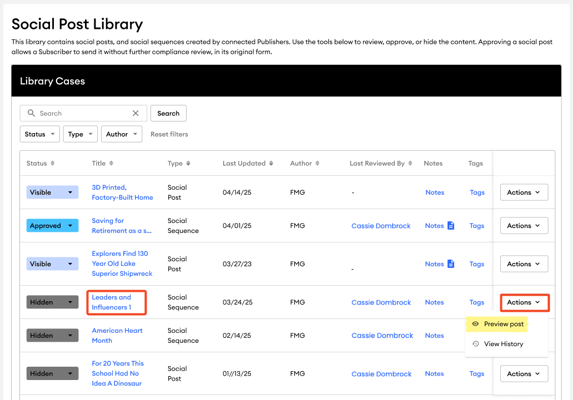
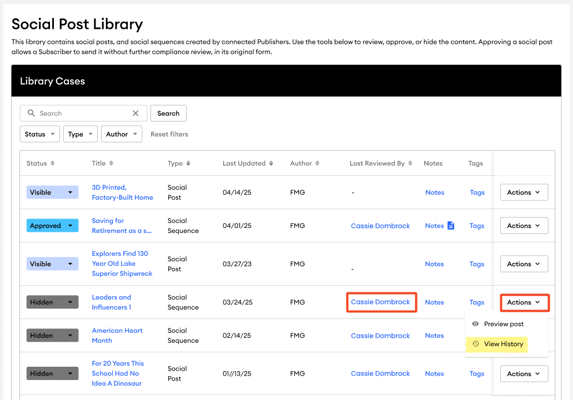
- Audit Trail: A complete history of all status changes is available for each piece of content.
- Notifications: Automated email notifications can be set up to alert compliance teams when new content is ready for review.
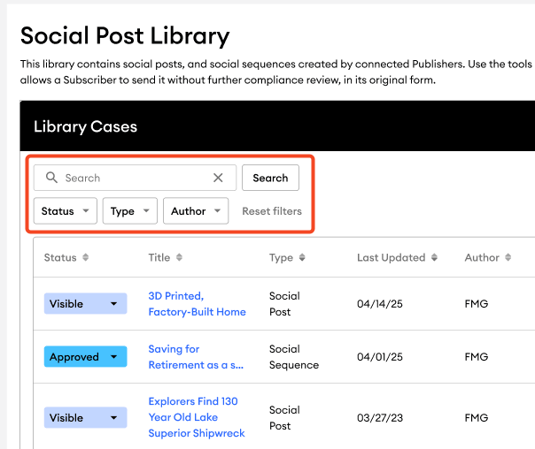
- Search and Filtering: The library includes tools for searching for content and filtering it by status, type, and author.
Common Questions:
Our Compliance Team has a review process outside of FMG for content pre-approval. How does this impact our workflow? We will continue to support these workflows for Social Posts and Sequences through an updated Compliance rules engine system.
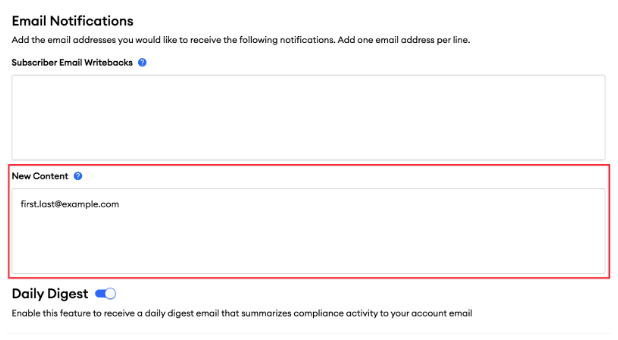
How will Compliance teams be notified when new content is added? Compliance teams can be notified of new content through email notifications. To set this up, navigate to the "Settings" page by clicking on your username in the upper right corner. Under the "Email Notifications" section, add the appropriate email addresses in the "New Content" area and click “Save” to ensure that all relevant team members receive alerts when new social posts or sequences are published.
Can Compliance officers perform bulk updates on Compliance statuses? No, we do not support bulk updates for pre-existing published content at this time. Instead, Compliance teams will individually review and update the compliance status of content pieces in their Content Library Cases area.
How does hiding content affect social sequences? Compliance Users cannot hide individual social posts that are part of a social sequence in the Social Compliance Library. While they can view the entire social sequence and have the option to hide it entirely, they cannot hide just a single post within the sequence. Hiding an individual social post will hide the entire social sequence.
What happens when a new Publisher/Agency is created? If a new publisher is linked to a subscriber account with direct compliance, the default global Compliance rule for social content will be set to “Visible.” If pre-approval is needed, the default must be changed to “Approved” through a home-office support request.
Email-Specific Disclosures for Individual Emails & Email Sequences - Available 9/10/25
We are now offering more options for email-specific disclosures that cover both individual emails and email sequences. This update allows Home Office Publishers to add disclosures to individual emails and sequences. It also gives subscribers (Advisors) the flexibility to create or customize disclosures in their emails, with all changes fully visible to Compliance.
Who is Affected?
- Publisher Admins → Can now apply disclosures to single emails and email sequences.
- FMG Customer Subscribers → Can now add/edit disclosures in custom emails and sequences.
- Compliance Admins → Gain visibility into edits from previously approved versions with highlighted tracking.
What's New?
For Home Office Publisher
- Add email-specific disclosures to one or multiple emails in a sequence.
- Lock an email (disclosure and email content cannot be altered) or leave it unlocked (subscribers may edit).
- Email and email sequence disclosures follow the same compliance review process as standalone emails.
More information: Publisher Admin | Adding a Content-Specific Email Disclosure
For FMG Subscribers (Advisors)
- Customers can add custom disclosures in the Email Footer when creating or editing emails or email sequences.
- Customers can edit agency-created disclosures only if their Home Office unlocks the email.
- Any changes to the email disclosure from the previously approved version are tracked in compliance review with a highlighted “diff view.”
- Disclosures always appear above the standard profile email disclosure.
- Home Offices may opt out of this feature by contacting their FMG Enterprise Success Manager.
More information: How to Add Email-Specific Disclosure
.png?width=395&height=475&name=Add%20a%20New%20Section%20(1).png "Add a New Section (1)")
Common Questions
- How do FMG subscribers (Advisors) use this new feature?
- Open the FMG Email Builder and either edit an existing email or create a new custom email.
- Scroll to the Email Footer section at the bottom of the email builder.
- Add your email-specific disclosure to an individual email or to multiple emails in a sequence.
- When finished, schedule the email to submit to Compliance for review.
- If you modify a firm-created disclosure, Compliance can identify your changes.
- Can Compliance see which edits the subscribers made to a firm-added disclosure?
Yes. If a subscriber edits a firm-created disclosure, those changes will appear in diff view, with edits clearly highlighted for efficient review. - Can subscribers add email-specific disclosures to just one email in a sequence?
Yes. Subscribers can apply disclosures to an individual email within a sequence. - Can subscribers edit the layout of disclosures?
No. While subscribers can edit the disclosure text, the display order is fixed. Disclosures always appear above the profile-level email disclosure. - Can the Home Office restrict this feature?
Yes. Home Offices may request to opt out of this update. To do so, please contact your FMG Enterprise Success Manager. - How can subscribers identify Content Library emails that include a firm-added disclosure? The email preview banner will display a note indicating the presence of a custom footer.
(See the example below.)
.png?width=773&height=500&name=AgencyCreatedEmailWithCustomFooterBanner%20(1).png "AgencyCreatedEmailWithCustomFooterBanner (1)")
- What does the email disclosure look like in an email?
The disclosure always appears above the subscriber’s approved profile disclosure, which was entered during account setup. (See example below.)
.png?width=704&height=500&name=SpecificEmailFooterExample%20(1).png "SpecificEmailFooterExample (1)")
This enhancement provides greater flexibility and control for firms and subscribers while ensuring clear oversight of every disclosure change.
New FAQ Website Widget Boosts SEO & AI Visibility - 8/4/25
We're excited to announce the release of FMG's new FAQ website widget, available to all FMG website customers using our latest Developer Theme. This powerful new section is designed to enhance SEO and AI discoverability automatically—no extra steps are required. No code. No lift. Just smarter search exposure. By simply adding this FAQ widget to any page on an FMG site, content will now be structured using schema markup, a behind-the-scenes upgrade that helps AI-powered search engines like Google SGE, ChatGPT, and Perplexity find and feature content in search results. That means greater visibility for niche expertise, local queries, and high-value answers, without needing a developer, marketer, or IT team.
What's Changing:
FMG websites now include a new FAQ section (widget) that adds built-in schema markup—the code that helps search engines and AI platforms better understand content. Advisors can simply drag, drop, and customize FAQs—our platform handles the technical details in the background.
Key Benefits:
- Smarter Search & AI Optimization: When people search for financial advice, content becomes more discoverable. Schema markup helps FAQ content appear as rich snippets and direct answers in AI and search engine results.
- Improved Client Experience: Advisors can answer common questions once, and let their website do the work. 24/7 access to clear, compliant answers builds trust while saving time on back-and-forth emails.
- Compliance-Friendly & Fully Auditable: FAQ content goes through your usual compliance workflow—no special process needed. It's fully auditable and archived like any other site update.
- No Coding or IT Work Required: Schema markup is applied automatically when an advisor adds the FAQ section—no coding or configuration required from IT, compliance, or marketing.
How Does It Work:
- Create or Edit an Existing Page: The user will leverage the website editor to create or edit a page to add the FAQ widget.
- Adding Content: Click '+ Add Section' while editing a page. Then, find the 'FAQ Section' within the 'Widgets' category on the left menu of the 'Add A New Section' modal, or use the search bar.
- Customization: Users can input their questions and answers to ensure the FAQ content aligns with their expertise and client needs.
Example of Adding a New FAQ Page:
Example of New FAQ Page:
.png?width=325&height=500&name=Example%20of%20an%20FAQ%20page%20(1).png "Example of an FAQ page (1)")
Common Questions:
- What is Schema Markup? It's microdata that helps search engines understand websites better, enabling rich snippets and AI-friendly answers in search results.
- Is this FAQ content compliant? Yes! All FAQ content flows through the standard compliance review and website archive process—no new workflow required.
- Can Compliance departments pre-review these sections? Like other editable sections, FAQs are reviewed as part of the page they're added to, not separately.
- Will publishers be able to use these new sections to create syndicated pages or for their advisors or agents? Not yet. This feature is currently built for individual advisor use, but publisher functionality is on our roadmap.
- Where can users locate the newly available sections? The new sections will be integrated into the visual editor. When creating or editing a page, users can access these sections by clicking on "+ Add Section." In the pop-up modal for "Add A New Section," they'll find the new FAQ section within the Widgets category on the left menu or by searching for "FAQ".
Overwatch Coach: Real-Time Compliance Email, Blog, and Social Content Guidance - 7/23/25
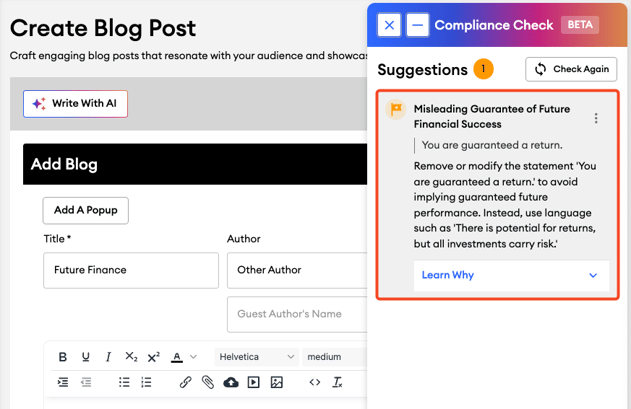
Overwatch Coach brings AI-powered compliance oversight directly into the copywriting creation process, whether it's an email, blog, or social post. As advisors draft copy in the FMG platform, the tool provides instant, contextual feedback on potential compliance issues—helping them align with FINRA and SEC standards before they hit submit. This proactive approach reduces the volume of submissions requiring manual edits, helps content move through review faster, and enables advisors to communicate more confidently—all while easing the burden on compliance teams. This feature is available for the Home Office add-on and is opt-in only. To learn more, please reach out to our success team at homeofficesupport@fmgsuite.com.
Why It Matters:
- Reduces Review Volume – Flags common compliance issues during drafting—before compliance submission.
- Speeds Up Content Approvals – Empowers users to fix flagged items in real-time, reducing back-and-forth.
- Supports Regulatory Alignment – Built to recognize language that may conflict with FINRA and SEC standards.
How Does It Work:
- Compose Content – Users draft their email, blog, or social content as usual.
- Use Overwatch Coach – Users can choose to run their content through Overwatch by selecting the “Check for Compliance” button in the email, blog, or social builder.
- Receive Feedback – Overwatch analyzes the content and provides feedback on potential compliance issues within a minute.
- Adjust Content – Users adjust their content based on the feedback and click “Check Again” to ensure compliance before scheduling the email, blog, or social post.
Overwatch Coach for Email:
%20(1000%20x%20500%20px)%20(4).gif?width=1000&height=500&name=Enterprise%20page%20(858%20x%20716%20px)%20(1000%20x%20500%20px)%20(4).gif "Enterprise page (858 x 716 px) (1000 x 500 px) (4)")
Overwatch Coach for Social:
%20(1000%20x%20500%20px)%20(6).gif?width=1000&height=500&name=Enterprise%20page%20(858%20x%20716%20px)%20(1000%20x%20500%20px)%20(6).gif "Enterprise page (858 x 716 px) (1000 x 500 px) (6)")
Overwatch Coach for Blog:
FMG AI Policy and Ethos:
We understand that home offices may want to review these capabilities in advance. To support your evaluation, you can access our FMG AI Policy & Ethos documentation, which answers the most common security and compliance questions.
FAQs - At a Glance:
How does Overwatch Coach work? Users draft emails, blogs, or social posts as usual and select the “Check for Compliance” button to receive live compliance guidance. Suggested edits can be applied prior to submission for final review.
What guidelines does it follow? Overwatch Coach flags content using a ruleset aligned with FINRA and SEC communication standards.
Can the rules be customized? Customization will be available in the future.
Want to learn more? Reach out to your FMG Enterprise Success contact to see how Overwatch Coach can improve your team’s workflow.
Muse: Smarter, On-Brand Email, Blogs, and Social Content Creation for Advisors - 7/23/25
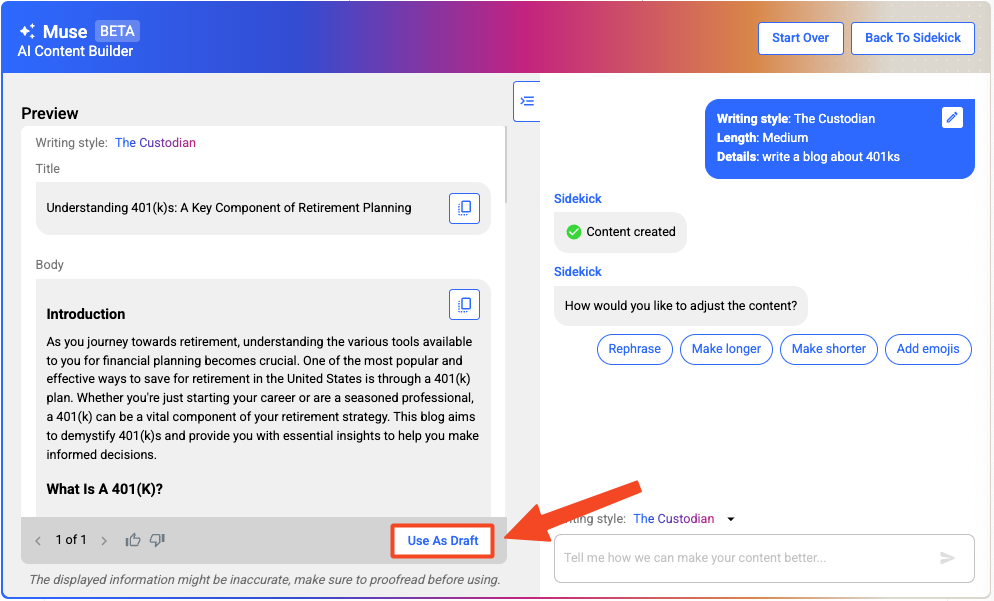
Muse helps advisors break through the blank page by generating professional, compliant email, blog, and social post drafts in seconds, tailored to their tone, audience, and communication goals. Advisors simply select a tone (e.g., conversational, professional, warm), provide basic inputs, and Muse generates a complete email, blog, or social post, all while supporting firm-approved messaging and compliance review protocols.
Why It Matters:
- Saves Time – Generates full email, blog, and social post drafts in seconds, reducing time spent writing from scratch.
- Voice Consistency – Supports firm-approved tone and messaging.
- Compliance Friendly – All content still flows through the existing review process.
- Reduces Friction – Helps eliminate “blank page” anxiety while maintaining professional polish.
Here's how Muse for email works for FMG customers:
Here's how Muse for social works for FMG customers:
Here's how Muse for blog works for FMG customers:
FMG AI Policy and Ethos:
We understand that home offices may want to review these capabilities in advance. To support your evaluation, you can access our FMG AI Policy & Ethos documentation, which answers the most common security and compliance questions.
FAQs - At a Glance:
Who gets it? Eligible Marketing Suite Premium customers.
Does the content require review? Yes, all generated content must go through the existing compliance review process.
Can advisors submit feedback? Yes—our product team is actively collecting input.
Can multiple drafts be generated? Yes, but unsaved content is lost when closing.
Will your AI tools be trained on advisors' private data? Information is protected. We won’t train on any sensitive or identifying information to keep you safe.
What’s on the roadmap? We have lots of Muse features in development! Muse is learning how to reference trusted breaking news to help produce new content. It will learn how to identify your brand voice and write content in your unique style. And Muse will be added to FMG’s website tools.
Want to learn more? Reach out to your FMG Enterprise Success team.
A Fresh New Look for the Content Library - 7/9/25
We’ve refreshed the Content Library experience to make it more intuitive, faster, and easier to use for all FMG marketing and website subscribers.
What's Changing?
We’ve rolled out a modernized interface that replaces the old tabbed view with a sleek, all-in-one layout. These updates are designed to make a user's day-to-day workflow smoother and more efficient.
Key Improvements You'll Notice:
- Intuitive Design: A cleaner, more cohesive layout for quicker navigation
- Enhanced Filtering: Easily sort content by category, type, or author
- Faster Performance: Faster load times for search results
- Smarter Content Management: New badges for recently added or updated content, plus more space for titles to help financial advisors scan and manage resources more easily
%20(1000%20x%20500%20px).gif?width=1000&height=500&name=Enterprise%20page%20(858%20x%20716%20px)%20(1000%20x%20500%20px).gif "Enterprise page (858 x 716 px) (1000 x 500 px)")
Why It Matters:
This refresh is all about helping financial advisors work smarter. Whether searching for content, planning a campaign, or updating their website, users can find it easier to get what they need—fast.Common Questions:
Does this impact email or website builder widgets? Nope! Those tools will continue to function as they do today.
Can users save their filters and sorting preferences? Not just yet—but that feature is on our roadmap for a future release.
What about compliance reviews—any changes? The compliance workflow hasn’t changed. If content needs a review before download, advisors will still get a clear alert via a pop-up dialog box.
We’re excited for financial advisors to experience the improved Content Library and hope it helps make their FMG experience even better. As always, feel free to reach out if you have any questions!
Contact Upload Limits for Enhanced Email Deliverability - 7/9/25
This new feature will enhance email deliverability and maintain high-quality contact lists by setting a contact upload limit for CSV uploads. This update aims to prevent unsolicited communications and ensure compliance with user thresholds. Until now, all users have been able to upload more than 30,000 contacts to their profiles, negatively affecting email deliverability. All users of the CSV Import tool will be affected, especially those who attempt to exceed the predefined contact limits. Enterprises with customized contact limits will need to adhere to their specific thresholds.
What's Changing?
A contact upload limit is being implemented, restricting CSV uploads to a maximum of 30,000 contacts, with specific enterprises having customized limits. During the CSV import process, if the total number of contacts exceeds the allowed limit, the system will halt the import and display an error message with guidance on how to proceed.
Key Benefits:
- Improved Email Deliverability: By enforcing contact limits, we reduce the risk of poor-quality email blasts and ensure that communications are sent to engaged recipients.
- Enhanced Compliance: This update aligns with our Terms of Service, requiring users to only contact individuals with whom they have a pre-existing commercial relationship.
- Consistent System Performance: Extending contact limits to CSV uploads ensures consistency across all tools, including CRM integrations and the CCD List Builder.
CSV Uploader:
.png?width=1054&height=585&name=Import%20CSV%20(1).png "Import CSV (1)")
Example of Error Message Upon Upload:
.png?width=1000&height=695&name=Error%20Message%20(2).png "Error Message (2)")
Common Questions:
What happens if users exceed the contact limit during a CSV upload? The system will stop the upload and display an error message indicating that the limit has been exceeded. Users will need to reduce their list size to proceed.
Can a user still add contacts manually if they’ve reached their limit? Yes, users can add contacts manually, one at a time, but CSV uploads will be restricted once the limit is reached.
Can users increase their contact limit? Users cannot purchase an increase beyond the set limit. Our system is intended to contact individuals with whom they have a genuine relationship.
Sidekick: Real-Time In-Platform AI Support for Advisors - 6/30/25
Sidekick is a built-in AI assistant that lives within the FMG dashboard, offering fast, context-aware help on platform features, marketing best practices, and technical support. No searching. No hold music. Just quick answers when advisors need them. Powered by FMG’s robust Knowledge Base and content resources. Sidekick helps advisors move faster and get more value from the platform.
Why Advisors Will Love It:
- Instant Answers: No delays—Sidekick responds in real-time with trusted guidance.
- Always Available: The chat window remains open while navigating the platform, keeping help accessible at all times.
- Built-In Escalation: If Sidekick can’t resolve a question, users can escalate directly to FMG’s support team from the same window.
See how it works:
%20(1000%20x%20500%20px)%20(3).gif?width=1000&height=500&name=Enterprise%20page%20(858%20x%20716%20px)%20(1000%20x%20500%20px)%20(3).gif "Enterprise page (858 x 716 px) (1000 x 500 px) (3)")
FMG AI Policy and Ethos:
We understand that home offices may want to review these capabilities in advance. To support your evaluation, you can access our FMG AI Policy & Ethos documentation, which answers the most common security and compliance questions.
FAQs - At a Glance:
Where does it pull answers from? FMG’s Knowledge Base.
Is live support still available? Traditional email and phone support are still available.
How do users send feedback? Users can rate answers and leave comments. The engineering team is monitoring this feedback to find areas of improvement.
Who gets it? All subscriptions by default—can be disabled firmwide upon request.
Looking for Customer-Facing Release Updates?
Check out our Suite New Releases page linked below.
Tip: You can always find the link to this page on the main page of our Knowledge Center (upper right > New Releases).